Software Solutions

An integrated software ecosystem that brings measurement, analysis, and quality control processes together on a single platform.

Integrated Software Platform

The core applications powering measurement and analysis workflows within the PAL ecosystem.

PalViewer

PalViewer

Measurement Visualization & Reporting
PalViewer

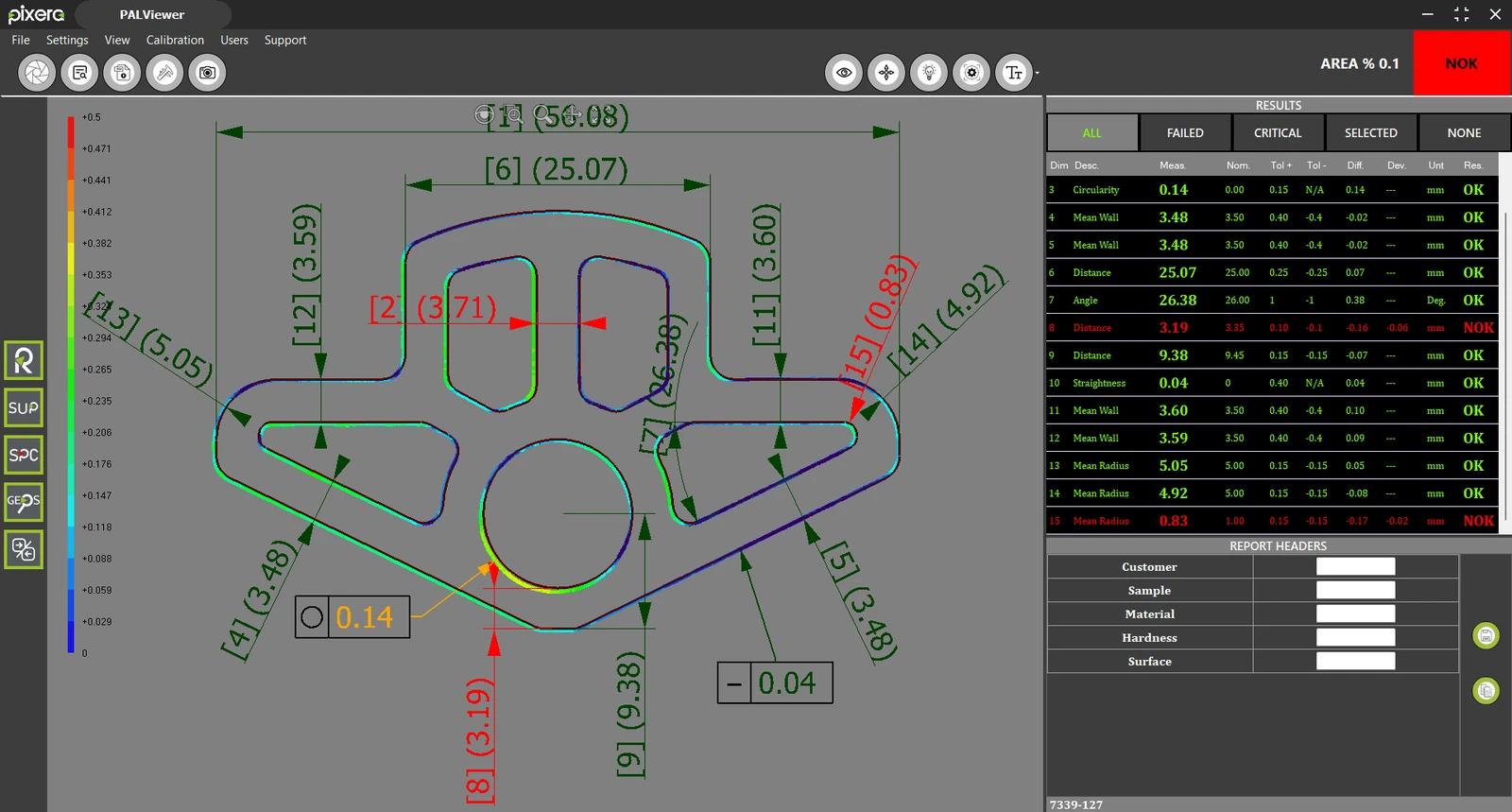
PalViewer is a software application developed for viewing, analyzing, and reporting measurements performed on PAL Series systems directly from office workstations across the factory network.

Providing the same user experience as the PAL measurement software, PalViewer allows users to review measurement results without accessing the measurement device itself. Scan files generated during inspection can be loaded into the software, enabling detailed visualization of point cloud data, CAD references, and measurement results.

With color-mapped deviation analysis, dimensional variations from the reference geometry can be evaluated quickly, while the OK/NOK status of critical measurements is displayed instantly. Users can further review measurement data, apply filters, and generate professional PDF reports.

PalViewer enables quality control, production, and engineering teams to access measurement data from their office environment, improving reporting efficiency and accelerating decision-making processes.

Point cloud and CAD data visualization
Color-mapped deviation analysis
Instant OK/NOK evaluation
PDF reporting and data sharing
Device-independent review and analysis
RefDesigner

RefDesigner

Reference Definition & Management

RefDesigner

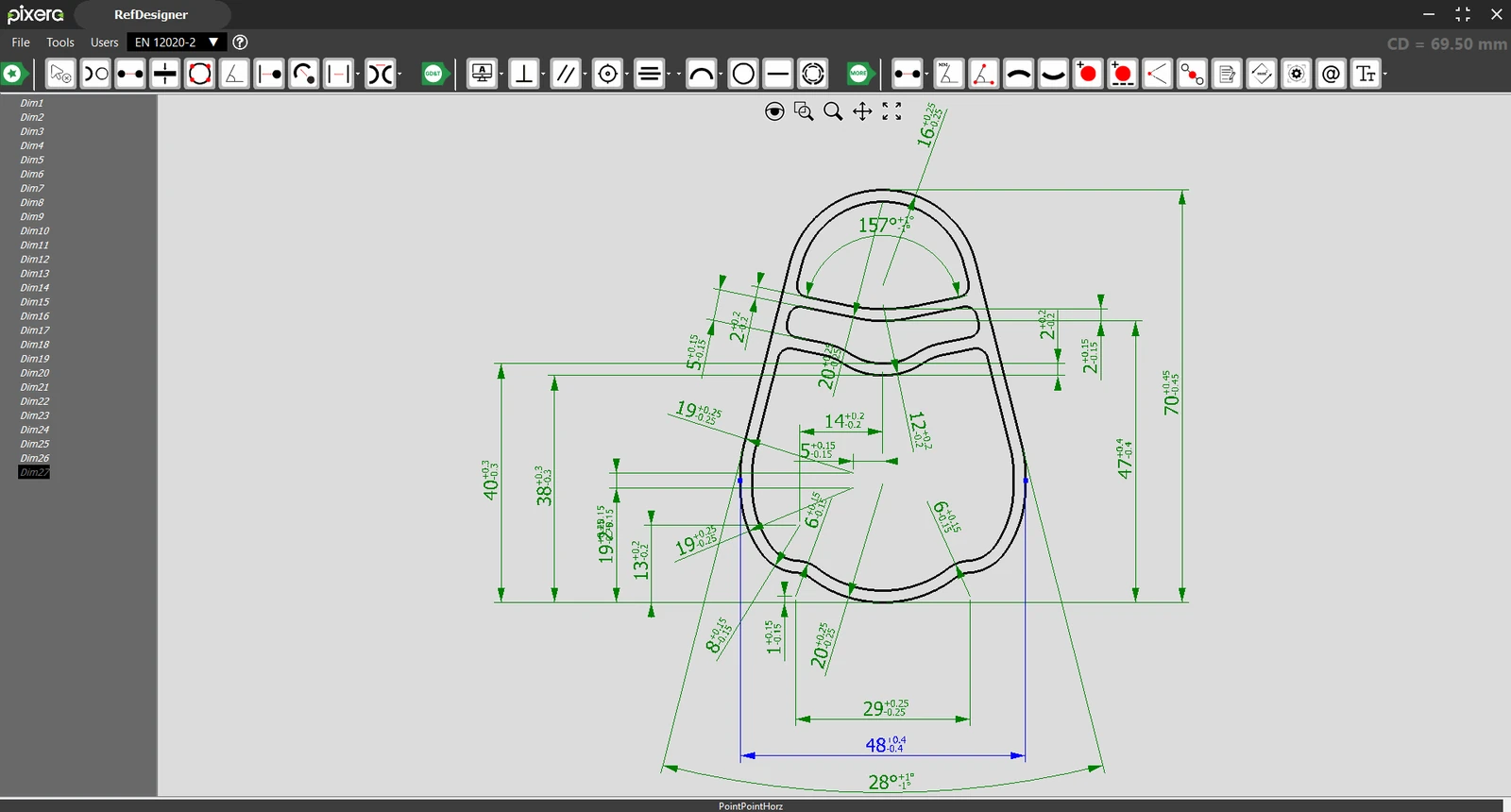
RefDesigner is the application used to create and manage reference files that form the foundation of measurement processes within the PAL ecosystem. CAD drawings (DXF, DWG) of the profile to be inspected are imported into the software, where dimensions, tolerances, and inspection criteria are defined to generate a reference file.

Prepared only once for each profile, the reference file serves as the basis for all future measurements. Operators can simply load the corresponding reference file in the measurement software and perform fast, repeatable measurements with a single click.

In addition to supporting widely adopted industry standards such as TS EN 12020-2 and TS EN 755-9, RefDesigner also allows users to create custom measurement standards. The software further supports geometric tolerances (GD&T) defined by ASME and ISO standards.

Reference files can be prepared independently of PAL Series optical measurement systems on standard PCs and stored on a central server through the factory network. This enables standardized measurement workflows across different operators and production lines.

TS EN 12020-2 and TS EN 755-9 standard support
ASME and ISO geometric tolerances (GD&T)
User-defined custom standards
DXF and DWG CAD data support
Device-independent operation and centralized reference management
GEOS

GEOS

Geometric Similarity & Profile Search

GEOS is an intelligent search application that performs geometric similarity analysis across reference files, CAD drawings, and scan data to quickly identify the closest matching profiles.

Users can upload a new CAD drawing or profile dataset and search across previously defined references. GEOS analyzes the entire database and ranks profiles according to their geometric similarity.

This enables manufacturers to determine whether a newly received profile request resembles a previously produced profile. Identifying similar profiles can support the reuse of existing dies, reducing both lead times and tooling costs.

GEOS can also be used to identify profiles with unknown part numbers or production records. Scan data acquired through the PAL system can be compared against existing references to find the closest matches and quickly retrieve the correct profile information.

Similarity analysis across reference files and CAD data
Ranking of geometrically similar profiles
Support for die reuse and cost reduction
Fast identification of unknown profiles
High-performance search algorithm

Advanced Modules

Complementary software tools that extend measurement, analysis, and quality control capabilities.

AutoDim

AutoDim

Automatic Dimension Import

AutoDim is a productivity module that automatically transfers predefined dimensions and tolerances from technical drawings into RefDesigner reference files. In the standard workflow, users import profile geometry into RefDesigner and manually define dimensions and tolerances. AutoDim eliminates this process by directly reading DWG and DXF technical drawings created in CAD software such as AutoCAD and SolidWorks, automatically importing existing dimension and tolerance information. As a result, technical drawings can be converted into measurement-ready reference files within seconds, without manually recreating dozens of dimensions. AutoDim significantly reduces reference preparation time while minimizing the risk of user-related errors. For manufacturers managing large numbers of profiles, AutoDim streamlines engineering workflows and delivers substantial time savings for quality and production teams.

  • DWG and DXF technical drawing support
  • Automatic recognition of dimensions and tolerances
  • Full integration with RefDesigner
  • Significant reduction in reference preparation time
  • Reduced manual input and user errors
Comparison Software

Comparison Software

Profile Comparison & Change Analysis

Comparison Software enables detailed analysis of dimensional changes by comparing measurements taken from the same profile at different points in time or from profiles produced using different dies. Users can compare historical measurement data to identify geometric changes, wear effects, or process-related variations. This makes it easier to monitor die performance over time and detect potential quality issues at an early stage. The software also allows comparison of profiles produced from different dies of the same product. As a result, dimensional differences between dies can be evaluated quickly, helping manufacturers achieve more consistent production quality.

  • Comparison of measurements from different time periods
  • Analysis of die changes and wear effects
  • Comparison of profiles produced from different dies
  • Visual evaluation of dimensional deviations
  • Support for quality control and process improvement
SPC Module

SPC Module

Statistical Process Control

The SPC Module provides statistical analysis of production measurements, enabling manufacturers to monitor quality performance and process stability over time. Measurement results generated by PAL Series systems are automatically transferred to the SPC module. Hundreds of measurements from the same profile can be analyzed, while trends and variations for each defined dimension are visualized through charts and statistical indicators. This allows production trends, process deviations, and potential quality issues to be identified at an early stage. The SPC Module supports process stability monitoring, sustainable quality control, and data-driven decision-making across manufacturing operations.

Reverse Engineering

Reverse Engineering

Point Cloud-Based Profile Analysis

The Reverse Engineering Module enables geometric analysis of profiles when CAD data is unavailable. Using point cloud data acquired by the PAL system, users can quickly and accurately evaluate the key dimensions and features of a profile. Built-in manual measurement tools allow users to measure distances, wall thicknesses, angles, diameters, and other geometric features directly on the point cloud data. Since no CAD reference is available, tolerance evaluation is not performed; the system provides actual measured values only. This module is an ideal tool for analyzing existing profiles, examining manufactured parts, and supporting CAD reconstruction workflows. The measurement data obtained from the point cloud serves as a valuable reference for engineering teams during the digital recreation of profile geometry.

Support Management System

Support Management System

Centralized Support & Device Management

The Pixera Support Management System is a user-friendly platform designed to monitor device maintenance, calibration schedules, and software updates from a single centralized interface. Users can view the current status of their devices, track upcoming maintenance and calibration activities, and verify that their software remains up to date. The platform also digitizes technical support processes by enabling users to create and manage support requests directly within the system. During a support request, users can upload relevant files, reports, and measurement data, allowing the Pixera technical team to analyze issues more efficiently and accelerate resolution times. All communication history, support records, and request statuses can be tracked through a single interface.